

Record a task once. Get step-by-step documentation with screenshots.
Run the Procera desktop recorder while performing a task. AI analyzes your actions, captures screenshots at each step, and generates a ready-to-share process guide — in about 2 minutes. Refine with feedback until it's exactly right.
Most process knowledge walks out the door when people leave
Stop re-explaining the same tasks. Document them once, automatically.
Procera captures what actually happens on screen — clicks, application context, timestamps — and turns that raw session data into a structured guide with screenshots at every step. Your team can review, refine with AI feedback, and export to DOCX or PDF.

From screen recording to published guide — in minutes.
Procera captures every action, app switch, and screenshot from a real session. AI reconstructs the workflow into a structured guide. You review, refine with feedback, and export.
- Open the budget file in Google Sheets
- Navigate to the Savings tab
- Update the monthly budget value in D12
- Confirm the value and save
This is what a generated guide looks like inside Procera
The example below was generated from a real 4-minute recording session. Each step includes the exact screenshot captured during recording.
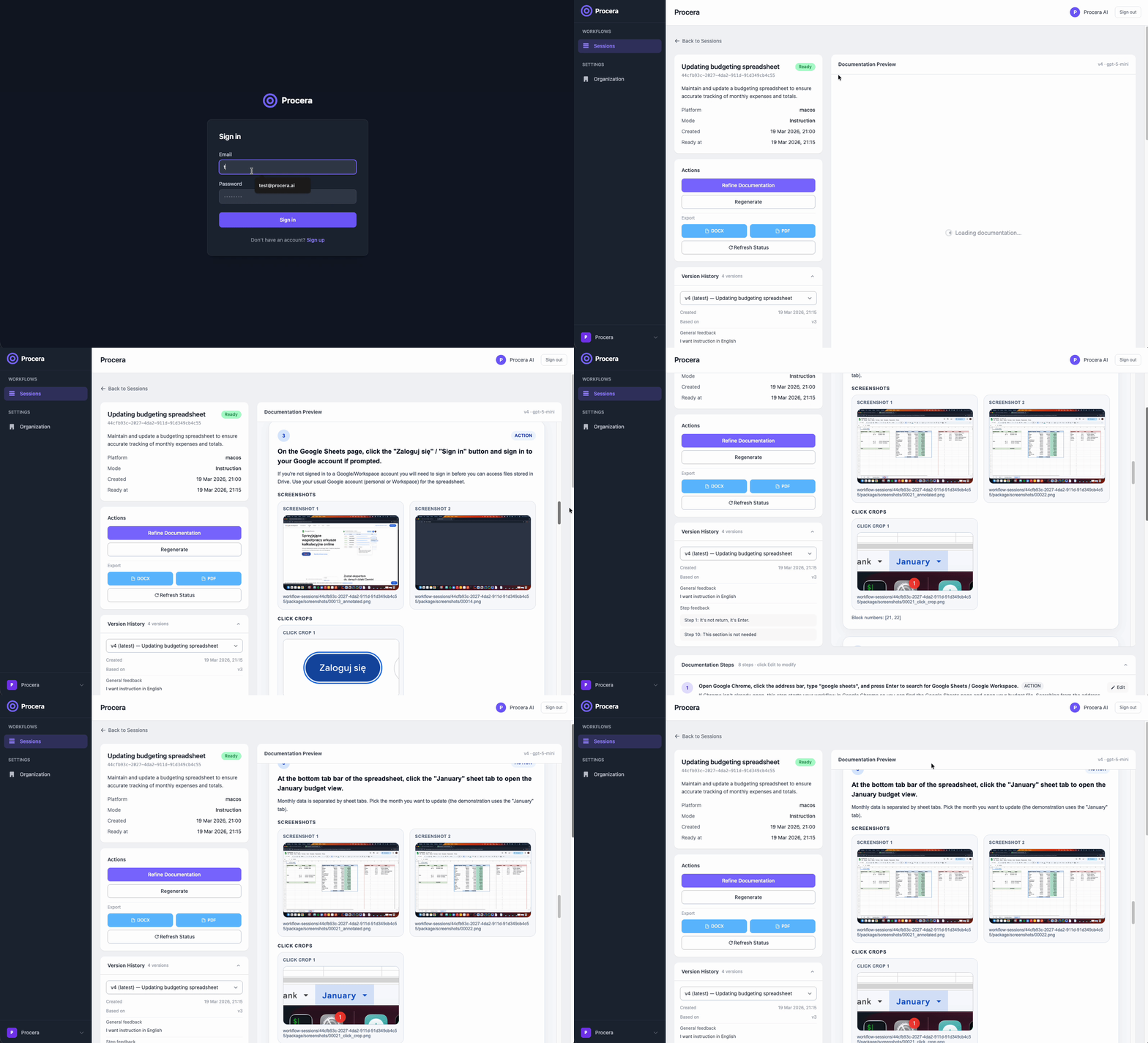
From login and organization selection, through a generated step-by-step instruction with screenshots, to a document ready for export — all inside Procera.
Designed for repetitive business workflows
Procera helps teams document processes that are usually passed around manually, explained on calls, or lost when key people leave.
Accounting operations
Document invoice entry, reconciliation flows, ERP tasks, and repetitive back-office procedures performed across spreadsheets and enterprise tools.
Example: "Enter supplier invoice into ERP from Excel — 7 steps, 4 screenshots"
CRM and internal systems
Capture how teams update records, process cases, move deals, and work across browser-based systems and desktop applications.
Example: "Qualify and move lead to active pipeline in CRM — 5 steps, 3 screenshots"
Employee onboarding
Turn expert workflows into step-by-step guides that new employees can follow without relying on shadowing sessions or manual notes.
Example: "First-day system access setup for new hire — 12 steps, 9 screenshots"
SOP and compliance documentation
Create clearer internal process documentation based on how work is actually done, not only how it is supposed to be described in theory.
Example: "Monthly bank reconciliation procedure — 9 steps, 6 screenshots"
Everything your team needs — from first recording to shared documentation
Procera covers the full lifecycle: capture, generate, refine, version, and export.
Desktop recorder for any workflow
Works across macOS and Windows. Captures actions in spreadsheets, web apps, ERP systems, and browsers — no integrations or plugins needed.
Step-by-step guides with screenshots
Every generated guide includes screenshots captured at key moments, so readers see exactly what the screen looked like at each step.
Refine with AI feedback
Type natural language feedback — "make step 3 more specific" — and AI rewrites the document. Iterate as many times as needed, each version saved automatically.
Full version history
Every refinement creates a new version. Review previous versions and restore any earlier state of the document at any time.
Export to DOCX and PDF
Export any version to DOCX or PDF. Share with team members who don't use Procera, or attach to existing knowledge bases.
Team and organization management
Invite members with defined roles: Owner, Admin, Member, or Viewer. Control who can record, edit, and publish documentation across your organization.
Real example: budget update documented automatically
A team member recorded a 4-minute session updating a savings budget in Google Sheets. Procera generated the guide below — 8 steps, each with a screenshot, ready in ~2 minutes.
- 01 Open the budget file in Google Sheets
- 02 Navigate to the Savings tab
- 03 Select cell D12 (Monthly budget)
- 04 Enter the updated savings amount
- 05 Confirm the value and save the file
Stop losing process knowledge. Start documenting it.
Procera is in early access. Tell us about your team's processes and we'll get you set up. Accounting, operations, onboarding — any repetitive workflow counts.